BloodHound · trading logic for NinjaTrader 8
Turn the rules in your head into signals on your chart.
BloodHound is the most popular trade designer for NinjaTrader. Connect conditions visually, see exactly where they line up, and change a rule in seconds. No code.
- 30-day free trial
- No code
- NinjaTrader 8 · Windows
Since 2012 building for NinjaTrader
Thousands of traders
No code point-and-click setup
30 days money-back guarantee
Why BloodHound
You already have rules. They just live in your head.
Trend up on the higher timeframe. A pullback to the moving average. RSI not stretched. A strong close. Most traders check something like this by eye, and by eye it’s never quite the same twice.
Checking by eye
- Every condition, every bar, held in your head.
- Missed setups while you were looking at something else.
- Rules that drift after a few losses, or a few wins.
- No honest answer to “how often did this setup actually happen?”
With BloodHound
- Each condition becomes a solver that NinjaTrader checks on every bar.
- Signals on your chart when your conditions line up, long and short.
- The same rules every time, until you decide to change them.
- Scroll back and see every place your idea would have fired.
Compared with NinjaTrader’s own tools
Faster to change than code. Deeper than a condition list.
NinjaTrader gives you two ways to turn rules into something it can run: write NinjaScript, or use the Strategy Builder. Here’s where BloodHound fits.
| NinjaScript | Strategy Builder | BloodHound | |
|---|---|---|---|
| How you build it | Writing C# code | Lists of conditions | Connecting conditions visually |
| Changing a rule | Edit, compile, reload | Edit, compile, reload | Change it, no compiling |
| Kinds of logic | Anything you can program | Conditions grouped with AND / OR | AND, OR, XOR, weighted scores, lookbacks, blockers, counters and more |
| Partly true conditions | If you code them | True or false only | Built in: conditions can count by degree |
| Places trades | Yes, it’s a strategy | Yes, it’s a strategy | No, it signals. BlackBird trades it |
Compared with NinjaScript and the Strategy Builder built into NinjaTrader 8.
Already code in NinjaScript?
Then BloodHound is about speed. In the time it takes to code, test and debug the first version of an idea, you can be on your twentieth in BloodHound. Your own indicators plug straight into its solvers, so you keep coding the parts that need code.
BloodHound quickly became my favorite trading tool. I now spend minutes doing what used to take hours coding.
Dan W.BloodHound user
How BloodHound works
Describe it. Connect it. See it.
Three steps, all point-and-click. BloodHound runs as an indicator on your NinjaTrader chart.
Step 1 · Solvers
Describe each condition
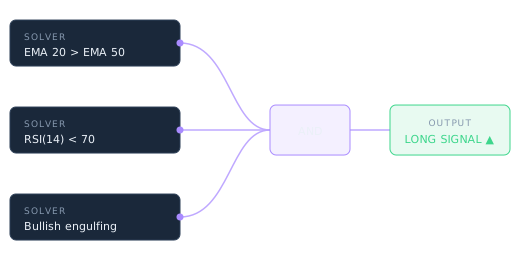
A solver checks one thing: one average above another, a slope, RSI past a level, a candle pattern, a level crossed, a condition on another timeframe. Point it at built-in, custom or third-party indicators.
| Solver | Long | Short |
|---|---|---|
| EMA 20 above EMA 50 | ✓ | — |
| RSI(14) below 70 | ✓ | ✓ |
| Bullish engulfing | ✓ | — |
Step 2 · Logic
Connect them
Wire the solvers together in a logic template: require all of them, accept any, weight them into a score, look back a few bars, or block signals when you should stay out.
| AND | All three agree |
| Signal Blocker | Not in the first 15 min |
| Output | Long signal ▲ |
Step 3 · Signals
See them on the chart
BloodHound marks where your logic fires, long and short, on live and past bars. Change a setting and look again. When you’re ready, BlackBird can trade the signals.
| Long output | Calculated on its own |
| Short output | Calculated on its own |
| Exit signals | Optional |
Logic templates
Simple rules, or a full scoring system.
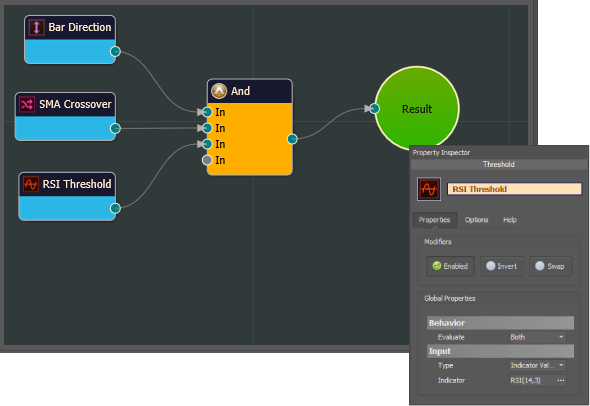
Start with three conditions and an AND. Grow into weighted scores, memory and filters when your idea needs them.
- Yes/no or by degree. Require every condition, or let conditions add up to a score. A condition can be partly met, not just true or false.
- Memory. Lookback, Signal Counter and Signal Extender react to what happened a few bars ago.
- Filters. A Signal Blocker keeps signals off when your conditions say stay out.
- Multiple timeframes. Make sure the higher timeframe agrees before a signal counts.
Test ideas faster
Change a rule. See the difference. Repeat.
BloodHound is built for iterating. Change a threshold, a filter or a connection and look at the signals again, without touching code.
- Write down the idea.
- Build it from solvers and logic nodes.
- Look at where it fired on past bars.
- Adjust, and look again.
- Connect BlackBird to test it with real entries, exits and sizing in NinjaTrader’s Strategy Analyzer.
Signals on past bars aren’t a backtest. A real test needs entries, exits, sizing, fills, slippage and commissions, which is what BlackBird adds. And a good backtest is still not a promise about live trading.
Cleaner charts
Five indicators in. One signal out.
Instead of stacking indicators and reading them all, let BloodHound read them and show you the one thing that matters: whether your conditions agree.
- A decision aid. Use it purely to spot your setups; you still choose and place every trade.
- More than entries. Show bias, entries, exits, or “stay out” conditions.
- Your indicators. Works with many third-party indicators. Using third-party indicators.
On its own or with BlackBird
BloodHound decides when. You, or BlackBird, decide how.
BloodHound is an indicator: it never places a trade by itself. That’s what keeps it flexible.
Discretionary
On its own
A tireless second pair of eyes. BloodHound marks the setups that meet your rules; you decide whether to take them and place the trade however you like.
Automated
With BlackBird
BloodHound supplies the entry and exit signals; BlackBird enters, manages stops and targets, exits on your exit signals and applies your daily limits. About BlackBird →
Most traders get both: the BloodHound + BlackBird bundle is our most popular option. See pricing →
Is it right for you?
Who BloodHound is for, and who it isn’t.
An honest picture before you download.
A good fit if you…
- Have trading ideas you want to test without learning C#.
- Trade by discretion and want your setups flagged the same way every time.
- Code in NinjaScript and want to try ideas much faster.
- Want to automate later: BloodHound and BlackBird are built to work together.
Probably not for you if you…
- Want a ready-made system that just makes money. You define the rules; we show you how with plenty of examples.
- Won’t put time into learning it. No code doesn’t mean no setup.
- Aren’t on NinjaTrader 8 for Windows.
- Want trade alerts from someone else’s strategy. We build tools, not trade calls.
From our traders
Traders who build their own systems.
SharkIndicators’ BloodHound is in a class of its own. It can empower your signal strategy creation in NinjaTrader without becoming a C# programmer.
Bob R.BloodHound user
The best tool I’ve come across in my 10 years of trading. I wish they were around when I first started out. I could have saved myself a bundle in research and development.
Ed A.BloodHound user
Very intuitive even with minimal programming experience. I can encode exactly what I want & significantly cut costs. BloodHound works exactly as advertised.
Fred E.BloodHound user
Testimonials may not be representative of the experience of other customers and are not a guarantee of future performance or success.
You won’t be on your own
Learning, support and people who answer.
There is a learning curve. These are here to shorten it.
Before you start
Questions traders ask first.
Still unsure? Ask us anything. Real people answer.
Does BloodHound place trades?
No. BloodHound is a NinjaTrader indicator: it calculates and shows signals. To trade them automatically, connect BlackBird, which enters and manages the trades.
Do I need BlackBird?
Not to use BloodHound. Plenty of traders use it as a decision aid and place trades themselves. You need BlackBird when you want the signals traded automatically.
Can BloodHound use my own or third-party indicators?
Yes. Many solvers can be pointed at custom or third-party indicators, as long as the indicator exposes its values to NinjaTrader.
I already code in NinjaScript. Why would I use it?
Speed. You can try many versions of an idea in the time it takes to code and debug one, and your own indicators work inside BloodHound. Keep coding what really needs code.
Is there a learning curve?
Yes. No code doesn’t mean no setup: you still decide what each condition should be. Docs, videos, regular live workshops and email support are there to shorten it.
Can I backtest a BloodHound idea?
BloodHound shows you where your logic would have fired on past bars. For a real test with entries, exits, sizing and costs, connect BlackBird and run it in NinjaTrader’s Strategy Analyzer or Playback, and judge the results critically.
Do I need a paid NinjaTrader license?
No. Every edition of NinjaTrader 8, including the free one, can run it. You only need a brokerage connection when you’re ready to trade a live account.
How is it priced?
A one-time purchase. Pay in full, or spread the full price over 12 monthly payments at no extra cost. Every purchase includes 1 year of updates, activation on up to 2 computers, and a 30-day money-back guarantee.
Most traders choose the BloodHound + BlackBird bundle, our best value. See pricing →
What happens after the first year?
Keep using it. After your year of updates, the last version released during that year keeps working with no restrictions. You can extend your updates period whenever you want the newest features. How the updates period works.
Build your first rule set this week. Free for 30 days.
Every feature, in simulation. When you’re ready, pay once or spread it over 12 months at no extra cost, with a 30-day money-back guarantee.
NinjaTrader 8 · Windows