BlackBird · trade management for NinjaTrader 8
Your trade plan, carried out the same way every time.
BlackBird places your stops and targets, moves them by rules you set in advance, sizes each trade from your risk, and enforces your daily limits. Click the entry yourself or let a signal take it: the management is the same.
- 30-day free trial
- Manual or automated entries
- NinjaTrader 8 · Windows
Trade plan · MES · Long 3 contracts
| Order set | Qty | Stop | Target |
|---|---|---|---|
| T1 | 1 | −10t | +12t |
| T2 | 1 | Lower BB | +24t |
| Runner | 1 | Lower BB | — |
| Trigger on | Action | Repeat |
|---|---|---|
| +8t profit | Stop → entry +2t | Once |
| +20t profit | Runner stop follows 20 EMA | Each bar |
| Daily loss limit | New trades off at −$500 |
| High-Water Mark | Stop after giving back 40% |
Concept illustration. Not a platform screenshot or a trading result.
Since 2012 building for NinjaTrader
Thousands of traders
No code point-and-click setup
30 days money-back guarantee
Beyond ATM strategies
An ATM strategy gives you a bracket. BlackBird gives you a plan.
If you trade on NinjaTrader, you know ATM strategies: a stop and targets at fixed tick distances, maybe an auto-breakeven and a stepped trail. BlackBird starts there and keeps going.
| NinjaTrader ATM | BlackBird | |
|---|---|---|
| Initial stops and targets | Fixed tick distances from entry | Fixed distances, or at the live value of an indicator such as a Bollinger Band or moving average |
| Breakeven | One auto-breakeven at a profit trigger | Any number of rules, at any trigger, with any offset |
| Trailing | Stepped trail in ticks | Trail by ticks or follow an indicator, in as many stages as you need |
| Which orders can move | Mainly the stop | Stops, profit targets and pending entry orders |
| Position size | A fixed quantity | Calculated from your risk and the stop distance |
| Daily limits | Not part of an ATM strategy | Loss limit, profit goal and High-Water Mark protection |
| Entries | Your click, or your own NinjaScript code | Your click, BloodHound signals or a compatible indicator |
Compared with the ATM strategies built into NinjaTrader 8.
There are so many useful features and options to employ. I should have purchased BlackBird a lot earlier. I had been using NT8’s ATM but not achieving the results I had planned.
Jacqui P.BlackBird & BloodHound user since 2022
Trade plans and order sets
Give every contract a job.
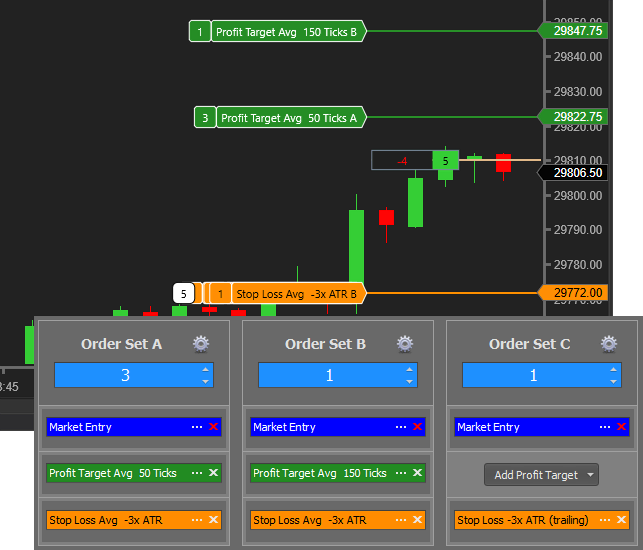
Split one entry into order sets, each with its own stop and target. A quick first target, a second one further out, a runner with no target at all: one click, and each part is managed on its own.
- Orders where the market is. Place stops and targets a fixed distance away, or at the current value of an indicator.
- OCO built in. When a target fills, its stop is canceled, and the other way round.
- Decided before the trade. How you scale out is part of the plan, not a decision made under pressure.
| Trigger on | Action | Repeat |
|---|---|---|
| Profit ≥ 8t | Stop → entry +2t | Once |
| Profit ≥ 16t | Stop follows lower Bollinger Band | Each bar |
| Profit ≥ 40t | Stop follows 9 EMA (tighter) | Each bar |

Trailing Actions
Move any order by rules, not by nerve.
A Trailing Action has three parts: what triggers it, what it does, and whether it repeats. Stack several to build exits a bracket order can’t express.
- Any order. Stops, profit targets and even pending entries can move.
- Any reference. Fixed steps, breakeven plus a few ticks, or the value of an indicator.
- Stages. Give a runner room early, then tighten it once the trade has paid.
- Placement and movement are separate. A stop placed at an indicator stays put unless a rule says to move it.
Dynamic Planning
See the trade before you take it.
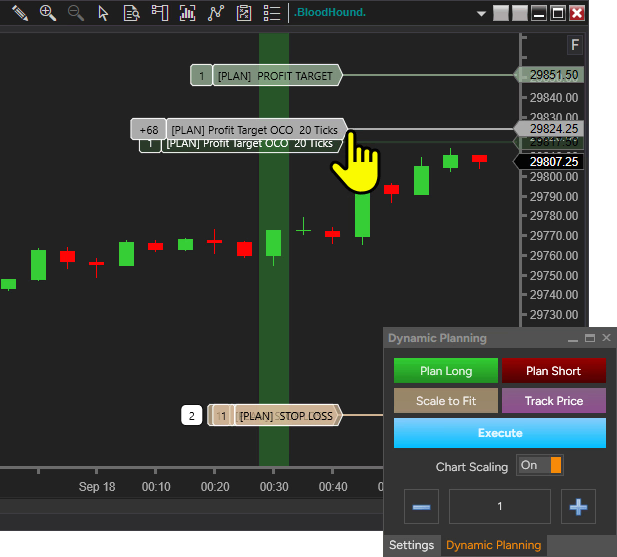
When stops and targets come from indicators, their prices change every bar. Dynamic Planning draws your plan on the chart at today’s levels, with the risk in ticks and dollars, so you know exactly what you’re about to click.
- Every order drawn. Entry, stops and targets for each order set, at current prices.
- Risk and reward up front. See what the trade risks and what it aims for before you commit.
- Same plan for every entry, whether you click it or a signal takes it.
Risk and money management
Size from your risk. Stop when your day is done.
The two decisions that matter most are the ones that are hardest to make in the moment. Make them in advance.
Position sizing
Know the risk before the fill
- Contracts calculated from the amount you’re willing to risk and the stop distance.
- Account-size based sizing, so position size grows or shrinks with the account.
- Risk/reward constraints for each trade.
Especially useful with indicator stops: two setups can need very different stop distances, so the same contract count would mean very different risk.
Daily safeguards
Limits that hold you to your plan
- Daily loss limit and daily profit goal: reach one and BlackBird takes no new trades that day.
- High-Water Mark: stop for the day after giving back a set share of the day’s peak profit.
- Trading schedules for automated entries, with an option to close open trades before the window ends.
- Applies to trades you click in BlackBird as well as automated ones.
Good to know: BlackBird calculates risk, but a stop is a plan, not a guarantee. Fast markets can slip past it. Safeguards cover the trades BlackBird places; they don’t block orders you place elsewhere in NinjaTrader.
Your entries, your choice
Click it yourself, or let a signal take it.
The trade plan doesn’t care where the entry came from. Many traders start by clicking and automate later.
Manual
You click
Spot the setup, click Buy or Sell in BlackBird’s chart panel, and let the plan take over. No signals or automation needed.
Your decision → BlackBird → NinjaTrader
Automated
BloodHound signals
Build entry and exit rules visually in BloodHound. BlackBird takes the signal, enters, manages the trade, and closes it on your exit signal. About BloodHound →
BloodHound → BlackBird → NinjaTrader
Automated
Your indicator
Already have an indicator that outputs long and short signals as values? BlackBird can trade them. An arrow drawn on the chart isn’t enough: the signal must be a value BlackBird can read.
Indicator → BlackBird → NinjaTrader
Signals from TradingView alerts or webhooks? That’s SharkSignals, which can hand trades to BlackBird.
Is it right for you?
Who BlackBird is for, and who it isn’t.
An honest picture before you download.
A good fit if you…
- Trade futures on NinjaTrader 8 and already know where your stops and targets belong.
- Manage trades by hand today and want it done the same way, every time.
- Run automated entries, or plan to, and need serious trade management behind them.
- Want hard daily limits that keep one bad day from becoming a bad month.
Probably not for you if you…
- Want someone to tell you what to trade. We build tools, not trade calls.
- Want a system to switch on and walk away from. You choose and test the rules (our videos show plenty of examples).
- Need a Mac or a browser platform. BlackBird runs inside NinjaTrader 8 on Windows.
- Hope software will fix a losing plan. BlackBird carries out your plan faithfully, good or bad.

From our traders
Traders who stopped managing trades by hand.
BlackBird’s ability to manage risk when trading is second to none! This tool was a game-changer for me. And the customer service and support at Shark is wonderful!
Steph T.BlackBird user
I always thought this kind of stop trailing control couldn’t be automated in software. So glad I was wrong.
James D.BlackBird user
BlackBird handles all of my pre-trade decisions and money management, allowing my second-guessing to remain on the sidelines.
@_RandwulfBloodHound & BlackBird user, via YouTube
Testimonials may not be representative of the experience of other customers and are not a guarantee of future performance or success.
You won’t be on your own
Learning, support and people who answer.
There is a learning curve. These are here to shorten it.
Before you start
Questions traders ask first.
Still unsure? Ask us anything. Real people answer.
Do I need BloodHound to use BlackBird?
No. Many traders click their own entries and let BlackBird manage everything after that. BloodHound is there if you want to automate entries with rules of your own.
Can I use BlackBird for manual trading?
Yes, it’s one of the main ways it’s used. You decide when to enter; BlackBird places the orders, moves them by your rules and applies your daily limits.
Do I need a paid NinjaTrader license?
No. Every edition of NinjaTrader 8, including the free one, can run it. You only need a brokerage connection when you’re ready to trade a live account.
Will it work with my broker or prop firm?
BlackBird runs inside NinjaTrader 8 and sends orders through the connection NinjaTrader is using. Some prop firms restrict automated trading, so check your firm’s rules before automating entries.
Can I backtest with BlackBird?
Yes. BlackBird is a NinjaTrader strategy, so with automated entries (from BloodHound, for example) you can test it in NinjaTrader’s Strategy Analyzer and compare different trade-management settings on the same entries. Judge the results critically: fills, slippage, commissions and overfitting all matter.
What if NinjaTrader crashes or disconnects?
Treat it like any trading platform outage: check your positions at your broker. After a restart, NinjaTrader may not be able to reconnect BlackBird to orders it placed earlier, so those may need managing by hand.
Will BlackBird make me profitable?
No software can promise that. BlackBird makes sure your plan is carried out precisely and consistently. Whether the plan makes money is up to the plan.
How is it priced?
A one-time purchase. Pay in full, or spread the full price over 12 monthly payments at no extra cost. Every purchase includes 1 year of updates, activation on up to 2 computers, and a 30-day money-back guarantee.
Most traders choose the BloodHound + BlackBird bundle, our best value. See pricing →
What happens after the first year?
Keep using it. After your year of updates, the last version released during that year keeps working with no restrictions. You can extend your updates period whenever you want the newest features. How the updates period works.
Run your trade plan on a simulated trade, free for 30 days.
Every feature, in simulation. When you’re ready, pay once or spread it over 12 months at no extra cost, with a 30-day money-back guarantee.
NinjaTrader 8 · Windows